Gmail Users Must Prepare for Native-Only Email Access as Google Phases Out Third-Party Integrations
Google recently announced significant changes to how Gmail handles external, non-Google email accounts. Starting in January 2027, Gmail will phase out key features that allow users to manage third-party email addresses—such as
@outlook.com, @yahoo.com, or custom webmail domains—directly inside the Gmail web interface.
If your team relies on Gmail to send, receive, or manage external email identities, now is the time to understand these upcoming changes and prepare your transition strategy.
What Is Changing in January 2027?
Google is discontinuing several third-party integration features on the web to reduce maintenance overhead and maintain high platform security standards.
-
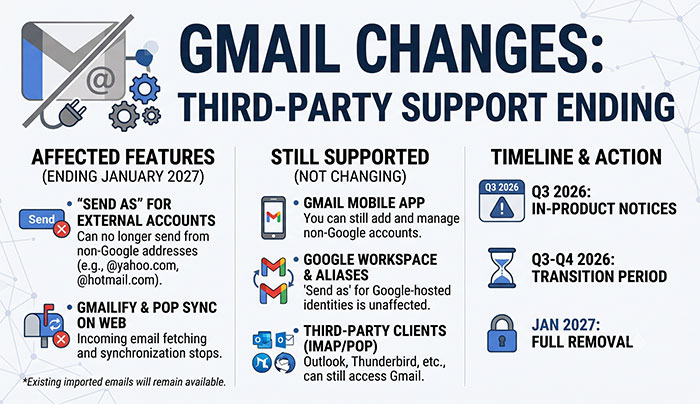
“Send As” for External Accounts: You will no longer be able to compose or send emails using non-Google email addresses from within Gmail on the web or through the Gmail mobile app.
-
POP Fetching & Gmailify on Web: Gmail will stop fetching incoming emails from third-party providers using POP or Gmailify on the browser interface.
-
Restricted New Setup: Leading up to the full removal, Google will restrict setting up new third-party POP or “Send as” configurations between Q3 and Q4 2026.
Important Note on Data Safety: Any emails you have already imported or synced into your Gmail account will remain intact. No historical messages or archived data will be deleted.
What Is NOT Changing?
This update strictly targets third-party account integrations within the web interface. Many core capabilities remain completely unaffected:
-
Google Workspace &
@gmail.comAliases: “Send as” functionality will continue to work normally for all Google-hosted identities, secondary@gmail.comaddresses, and official Google Workspace aliases. -
Gmail Mobile App: You can still add, view, and send from third-party email accounts directly inside the official Gmail app for iOS and Android.
-
Third-Party Email Clients: Accessing your primary Gmail account via external apps like Microsoft Outlook, Apple Mail, or Mozilla Thunderbird using IMAP/POP remains fully supported.
-
Server-Side Forwarding: Setting up auto-forwarding on your external email server to send incoming messages directly to your Gmail address will continue to work as usual.
The Sunset Timeline
Google is providing a generous buffer period so individuals and businesses can plan ahead:
| Phase | Timeline | What Happens |
| Notice Period | Q3 2026 | Google officially begins issuing in-product notifications to affected users. |
| Transition Period | Q3–Q4 2026 | Existing configurations continue working, but setting up new connections becomes restricted. |
| Full Phase-Out | January 2027 | Third-party “Send as”, Gmailify, and web POP fetching are completely disabled. |
How to Prepare Your Email Setup
To avoid any disruption to your day-to-day operations, consider transitioning to one of the following alternatives prior to the 2027 deadline:
-
Migrate Fully to Google Workspace: If you rely on external addresses for business, migrating your custom domain directly to Google Workspace allows you to retain native alias support and unified account features seamlessly.
-
Use Desktop Email Clients: Applications like Microsoft Outlook, Apple Mail, or Thunderbird handle multiple email protocols natively via IMAP/SMTP, giving you a centralized dashboard for all your accounts.
-
Configure Auto-Forwarding: Enable automatic forwarding on your third-party provider to send all incoming mail directly to your primary Gmail inbox.
-
Use Native Provider Portals: Access non-Google accounts directly via their official web interfaces (e.g., Outlook.com or Yahoo Mail) or dedicated native apps.
A Word on Security: Exercise extreme caution with third-party browser extensions claiming to restore “Send as” functionality. Giving external extensions access to your email credentials or OAuth tokens creates major security and privacy vulnerabilities.
Need Help Transitioning?
Managing email migrations and workflow adjustments can be tricky. As your trusted IT solutions provider, we can audit your current email environment, identify affected accounts, and recommend the best long-term setup for your organization. Contact our support team today to schedule an email architecture review well ahead of the deadline!