
A provider's claim that malware has been removed is not evidence by itself. A WordPress malware cleanup report turns that claim into something you can check before accepting the work.
For a Singapore business, the stakes go beyond uptime. Your site may sit on shared hosting, collect customer details through forms, or process payments. If data was touched, questions under the Personal Data Protection Act (PDPA) can follow, and your report becomes the first document you reach for.
In practice, the report also protects you commercially. It states what was examined, what was excluded, and what remains open. That is exactly what you need before signing off — and what you will wish you had if the site is reinfected or a dispute arises later.
In this blog, we discuss what a complete cleanup handover should contain. We cover scope, evidence, verification, handover duties, and Singapore's PDPA notification criteria.
Why Should You Scrutinise the Cleanup Report Before Signing Off?
Because the report can provide an auditable record of what was done. A verbal 'all clear' cannot be checked, escalated, or defended later. The written record helps you check what was examined and what was left out.
A good report also keeps acceptance honest. Sign-off should refer to the agreed work and any recorded exceptions. It should never promise that reinfection is impossible, because no honest provider can promise that.
Our team recommends this checklist as a matter of professional judgement. It is not a verified description of IT Solution's report template.
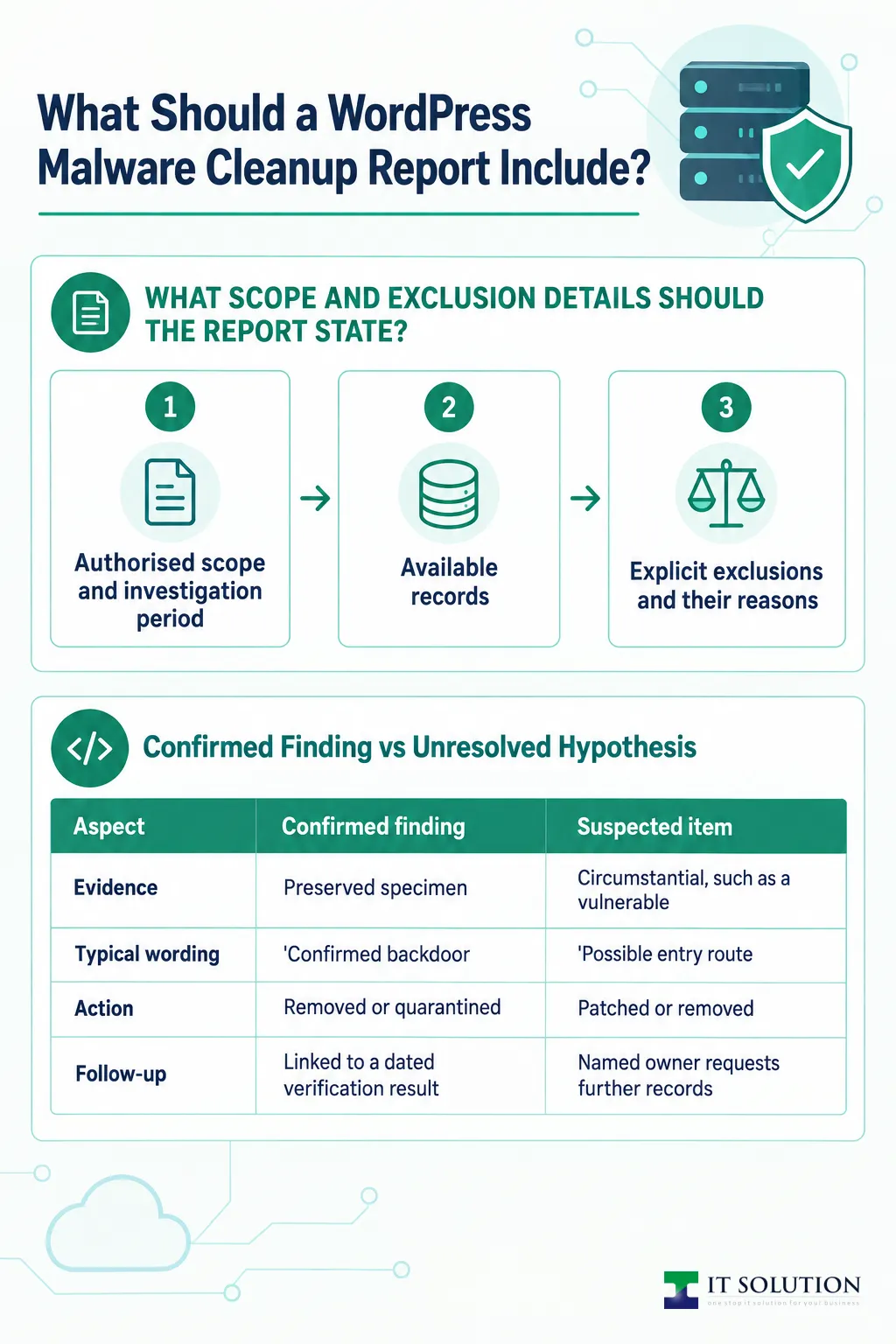
What Scope and Exclusion Details Should the Report State?
Ask for the authorised scope, the affected assets, the investigation period, the records that were available, and every exclusion. This section sets the boundary for everything else in the report.
1. Authorised scope and investigation period
The report should name the WordPress installation, its database, and the log sources actually reviewed. It should state the dates the investigation covered and the timezone used, so timestamps can be reconciled later.
2. Available records
Many incidents lack complete logs, especially on shared hosting where old access logs rotate away quickly. A report that says nothing about missing records is weaker than one that lists the gaps openly.
3. Explicit exclusions and their reasons
A thorough report states what was not examined: other sites on the same shared server, the hosting infrastructure itself, email accounts, and staff devices. Recommended wording is: 'We examined the named WordPress installation, its database, and the logs supplied for this engagement. We did not examine other hosted applications, hosting infrastructure, email accounts, or endpoint devices. No conclusion is offered on their security.'
Core Sections of a Cleanup Report
| Report section | What it should tell you |
|---|---|
| Incident summary | What happened, when it was detected, and the business impact |
| Scope and exclusions | What was examined, what was not, and why |
| Evidence timeline | Dated records with a stated timezone |
| Findings register | Each issue as confirmed or suspected, with evidence references |
| Verification results | What was checked, how, when, and with what limits |
| Outstanding actions | A named owner and deadline for every open item |
| Acceptance conditions | What the sign-off covers, and any recorded exceptions |
How Should the Report Separate Confirmed Findings From Hypotheses?
Each finding should carry an identifier, a confirmed or suspected status, and the affected component. It should also reference the evidence, action taken, verification result, and remaining uncertainty. That structure lets you see at a glance what is proven and what is still open.
Consider a hypothetical example, not a record from any job. Imagine an unexpected PHP file under wp-content/uploads. Its code allows request-controlled input to reach a command-execution function without authentication. That behaviour could support a confirmed backdoor finding if an analyst establishes that the file is unauthorised. A preserved copy, collection time, and quarantine record could support the evidence trail. A digest helps check evidence integrity, but does not establish maliciousness by itself. No specimen, digest, or quarantine record is supplied here. A scanner alert or unfamiliar filename alone would only be a lead. Ask a qualified engineer to assess the evidence and classification in any real finding.
One more distinction matters. Evidence that a file could cause harm does not, by itself, prove it was ever used or that data was stolen. A careful report describes capability and evidence of use separately.
Site type also shapes expectations here. A site with checkout may need payment-flow investigation that is unnecessary for a site without payments. Even so, never assume a simple site holds no personal data — a contact form collects names and email addresses too. After a store incident, ongoing e-commerce website maintenance should cover the components the cleanup touched.
Keep the client's evidence pack separate from any public example. Remove identifying and exploitable details, and check for hidden document content before sharing. Technical approval alone does not grant publication permission.
How Should an Unproven Entry Vector Be Worded?
Initial access is often the hardest question to answer. Historical logs may have rotated away, attackers can alter file timestamps, and the version of a vulnerable component at the time of entry is frequently unknown. A vulnerable plugin found during cleanup is a possible route, not proof of how the attacker got in.
Ask for wording that a non-technical owner cannot mistake for fact. In a hypothetical example, exploitation of a vulnerable component could be described as a possible entry route. Available records might not establish initial access or exclude other routes.
Every open hypothesis should carry an owner and a follow-up. For example, the hosting account holder can request retained access logs, and the technical lead reassesses the hypothesis when those arrive. Meanwhile, the exposed component should be patched or removed and credentials rotated. Remediation should not wait for the cause to be confirmed.
Confirmed Finding vs Unresolved Hypothesis
| Aspect | Confirmed finding | Suspected item |
|---|---|---|
| Evidence | Preserved specimen, digest, and code analysis | Circumstantial, such as a vulnerable component being present |
| Typical wording | 'Confirmed backdoor; no evidence it was used' | 'Possible entry route; not established by available records' |
| Action | Removed or quarantined, with absence verified | Patched or removed, with investigation kept open |
| Follow-up | Linked to a dated verification result | Named owner requests further records, with a reassessment date |
What Verification Evidence Should You Expect to See?
This is the heart of any WordPress malware cleanup report: dated verification results showing what was checked, how, and with what limits. A single green screenshot does not qualify.
1. Software integrity comparison
Files should be compared against official reference copies, such as the checksum verification available for WordPress core. Coverage matters — premium and custom code may not have a public reference, so ask how those files were reviewed and whether a trusted reference copy was available.
2. Scans with stated coverage
A scan result is meaningless without context. The report should name the scanner, its signature-update time, the scope scanned, any exclusions, and any unresolved detections.
3. Persistence checks
Reactivation tricks survive naive cleanup. Ask whether uploads, must-use plugins, scheduled tasks, administrator accounts, configuration files, and database content were inspected for persistence mechanisms.
4. Functional testing
A restored site should still work. Expect recorded tests of login, forms, key pages, and scheduled jobs — and, for a store, a sandbox checkout that never exposes payment data.
5. External status as corroboration
Where access exists, ask for a timestamped Google Search Console's Security Issues report and a Safe Browsing status check. Read a clean result as corroboration, never as proof — and remember that submitting a review request is not the same as a warning being cleared.
Point-in-Time Checks vs Ongoing Monitoring
| Aspect | Point-in-time check | Monitoring period |
|---|---|---|
| What it covers | The site's state at one moment | Logs and recurrence over a defined window |
| Strength | Repeatable, dated evidence | Catches delayed reactivation or reinfection |
| Limits | Says nothing about tomorrow | Only as good as the logs available |
| Question to ask | 'Exactly what ran, and when?' | 'What period, what coverage, and any gaps?' |
How Do Point-in-Time Checks Differ From Ongoing Monitoring?
A report should distinguish a snapshot from a period of observation. Ask whether monitoring was included, what it covered, when it started and ended, and whether any gaps occurred. A provider can then distinguish an initial handover from later closure after that observation window — and you can see exactly what evidence each claim rests on.
What Should the Handover Assign to Your Team?
A cleanup ends with a register of outstanding actions, each with a named owner and an agreed deadline. Deadlines should be agreed for your particular engagement, not assumed from a template. Ask who owns web application firewall and DDoS protection after handover.
1. Credential rotation and session invalidation
Passwords for WordPress, hosting, SFTP (Secure File Transfer Protocol), the database, and relevant email accounts should be changed, with session invalidation and replacement of WordPress salts and security keys.
2. Updates and MFA
Outstanding updates should be tracked to completion, and multi-factor authentication (MFA) enabled on every administrative account.
3. A tested backup and restore arrangement
A backup is only as good as a restore you have actually tested. If important business data also lives in cloud productivity suites, a tested Google Workspace cloud backup closes the same gap.
4. Ongoing protection
Ask whether a web application firewall and DDoS protection layer now stands in front of the entry points that were exposed. Some SMEs fold all of this into a fully managed IT services arrangement so nothing is left unowned after handover.
Report Red Flags and Better Alternatives
| Red flag wording | What to ask for instead |
|---|---|
| 'Site completely secure' | Acceptance limited to the agreed scope, with exceptions noted |
| 'No further threats found' | An explicit list of systems not examined, with no conclusion offered |
| 'Virus removed' | The finding identifier, its evidence reference, and the verification result |
| 'Cause identified' | A clearly labelled hypothesis where records cannot prove initial access |
When Does a Cleanup in Singapore Need Specialist Escalation?
Not every incident stays within routine cleanup. Signs of unauthorised database exports, suspicious outbound transfers, checkout code sending data to an unapproved destination, privileged hosting-level compromise, or repeated reinfection after remediation may justify specialist incident response. Where possible, relevant evidence should be preserved before destructive cleanup begins.
A payment-page incident also needs coordination with your payment provider under the applicable arrangements. Restoring the page does not resolve the exposure question — that is a separate investigation.
Separately, a security incident can raise personal-data obligations. Under the PDPA, a personal-data breach is notifiable if it causes, or is likely to cause, significant harm to individuals. A breach is also notifiable if it is of significant scale. The prescribed significant-scale threshold is 500 or more affected individuals. A smaller breach can still be notifiable because of significant harm.
After determining a breach is notifiable, the organisation must notify the Personal Data Protection Commission (PDPC) as soon as practicable. It must do so no later than three calendar days after that determination. The first day is the day after the determination. Affected individuals must be notified where required, subject to exceptions. That notification must be made as soon as practicable, at the same time as or after notifying the PDPC. Involve your data protection officer and a qualified Singapore privacy adviser in assessing the circumstances.
The PDPC publishes the Guide on Managing and Notifying Data Breaches under the PDPA, which sets out these criteria, deadlines, and exceptions at the time of writing. Do not wait for the final cleanup report before starting that assessment. If your report shows signs of data extraction, contact us early so evidence can be preserved while the assessment runs.
Conclusion
A credible handover gives you more than a clean bill of health. It shows the scope, findings, verification results, and your outstanding actions. If monitoring was included, it also records its coverage and results.
Hold any provider — including us — to that standard before you accept the work. Ask the questions in this article, and treat a report that cannot answer them as unfinished rather than as proof of completion.
IT Solution supports Singapore SMEs with WordPress cleanup, website security, and ongoing maintenance. If you are dealing with a compromised site, or want a second opinion on a cleanup handover before you sign off, talk to our team.
Want a Cleanup Handover You Can Actually Verify?
Send us your site details or an existing cleanup report, and our team will review what evidence is missing before you accept the work.
Frequently Asked Questions
No. Ask what the scan covered, its exclusions, and whether persistence checks and functional tests were recorded. A clean result is corroboration, not proof.
A confirmed finding rests on evidence of malicious behaviour, not a file digest alone. A suspected item is a hypothesis the available records cannot yet prove.
No honest report should. Acceptance should refer to the agreed scope and any recorded exceptions, not promise that reinfection is impossible.
A personal-data breach is notifiable if it causes, or is likely to cause, significant harm, or is of significant scale. The prescribed scale threshold is 500 affected individuals. A smaller breach can still be notifiable because of significant harm. The organisation must notify the PDPC as soon as practicable and within three calendar days after determining the breach is notifiable.
The handover register should assign each outstanding action a named owner and an agreed deadline. Typically the client owns credential rotation, updates, and tested backups after sign-off.

Qin
Digital Marketer
The company's offerings to include IT solutions such as domain registration, hosting, and comprehensive website services alongside digital marketing. Her work encompasses website development, graphic design, and email solutions to provide holistic digital strategies, focusing on Digital Business & Systems.