One vendor console can look like it handles employee monitoring, ransomware protection and backup for your whole office. The catch is that a shared dashboard is not the same as one licence covering all three jobs.
Each function answers a different question. Monitoring records who did what, and when. Endpoint protection blocks malicious encryption as it happens. Backup keeps a second, recoverable copy of your business files. Products that claim all three usually cover some functions well and others thinly.
Getting this wrong costs small and medium-sized enterprises (SMEs) twice. You either pay again for protection you already hold, or you find the missing copy only after files are gone. Staff monitoring also carries duties under the Personal Data Protection Act (PDPA), so a bundled extra can create obligations nobody planned for.
In this blog, we discuss how the three functions differ, what to verify before signing, when separate tools beat a bundle, how to prove a restore works, and what Singapore law lets employers monitor.
Why Are Employee Monitoring, Ransomware Protection and Backup Sold as Different Products?
Because the three jobs keep different records, answer to different owners and fail in different ways.
A monitoring log is evidence about people. A protection agent is a defence running in the present. A backup is an insurance copy you hope never to use. Bundles blur those lines, and blurred lines are where costly assumptions live. For a wider view of common cyber threats and how to prevent them, our cyberthreat guide is a useful companion.
1. Employee activity records
Monitoring answers questions about people: which apps ran, which sites were visited and when someone was active. It is behavioural evidence, not a copy of your files. An activity log cannot rebuild a corrupted spreadsheet, so never count monitoring recordings as business-file backups.
2. Endpoint threat detection
Protection agents watch processes and file behaviour on each machine to stop encryption in progress. They defend the present moment only. They do not hold historical copies you can roll back to.
3. Business-file backup
Backup keeps recoverable copies of laptop files, mailboxes and document libraries. Its value sits in the recovery plan: what is in scope, how fresh the latest copy is and how fast it restores.
What Should You Verify Before Buying an All-in-One Platform?
Verify the exact licence you are buying, not the story wrapped around it.
From the scoping work we do for SME purchases, one pattern repeats: the service schedule, not the brochure, defines what you own. Ask for the SKU, the service schedule and the feature matrix in writing. Then run an acceptance test before the rollout is called done.
Check entitlements you already hold, too. Some Microsoft 365 business plans include device-security features, so confirm your current licence before paying for a second endpoint product.
1. The exact SKU and service schedule
Two similar-sounding plan names can differ by one included workload. The contract schedule is what any dispute turns on, so match every promised function to a line item.
2. Operating-system coverage per function
Backup, protection and monitoring each list supported operating systems separately. A plan that backs up Windows laptops may not protect or monitor your macOS designers.
3. Cloud workload coverage
Confirm Exchange Online, OneDrive and SharePoint appear by name in the backup scope. Synchronisation, version history and recycle bins are useful recovery features, but treat them as safety nets rather than a scoped backup service.
4. What monitoring actually captures
Screen, application, URL and keystroke capture vary by agent, operating system and subscription tier. Get the feature matrix for each platform before assuming full visibility.
Functions, Owners and Limits at a Glance
| Function | What it keeps | What it cannot do | Where it usually sits |
|---|---|---|---|
| Employee activity monitoring | App, web and time records per employee | Restore lost or encrypted business files | HR or a compliance owner |
| Endpoint protection | A defended machine, blocked in real time | Hold historical copies to roll back to | Your IT support or managed provider |
| Business-file backup | Recoverable copies of laptop files | Say who caused the incident | Your IT support or managed provider |
| Cloud-suite backup | Copies of scoped mailboxes and document libraries, including cloud-only files | Cover files stored only locally | A managed provider, scoped separately |
When Should a Singapore SME Buy Separate Tools Instead?
Buy separate tools whenever the bundle cannot demonstrate the operating systems, cloud workloads, monitoring scope or recovery objectives you actually need.
Our working rule is simple: one product is suitable only if its purchased features demonstrably meet your monitoring, protection and recovery requirements. Anything inferred from a dashboard does not count.
Hybrid environments push the split further. If you keep a server on-site, or rent micro data centre rack space in Singapore for legacy equipment, server backup becomes its own scoped service with its own recovery target. And if prevention is the pressing worry, our ransomware protection services page sets out how hardening and response sit alongside backup.
1. Mixed devices and operating systems
Designers on macOS, staff on Windows and any Linux users rarely fit one agent's full matrix. Split the stack along the line the vendor's own documentation draws.
2. Cloud-only files
A file created directly in a cloud suite may never exist on any laptop. Endpoint backup can copy the folder structure yet miss the contents, so scope cloud-suite backup on its own.
3. A justified monitoring purpose
Buy monitoring for a defined business reason, never simply because it came bundled. An unconfigured licence is a compliance risk sitting idle on your bill.
4. Recovery objectives a bundle cannot meet
Long retention, short recovery windows or specific storage regions can exceed a bundle's tiers. Priced add-ons sometimes cost more than a specialist tool.
How Do You Prove Backups Actually Restore?
Run a restore exercise, because a blocked attack in a test does not prove your files come back.
Protection tests and recovery tests answer different questions. A vendor-approved simulator that gets stopped tells you the agent works. Only a controlled deletion and a real restore tells you the backup works. Gaps tend to surface in backup manifests and failed test restores, not on green dashboards.
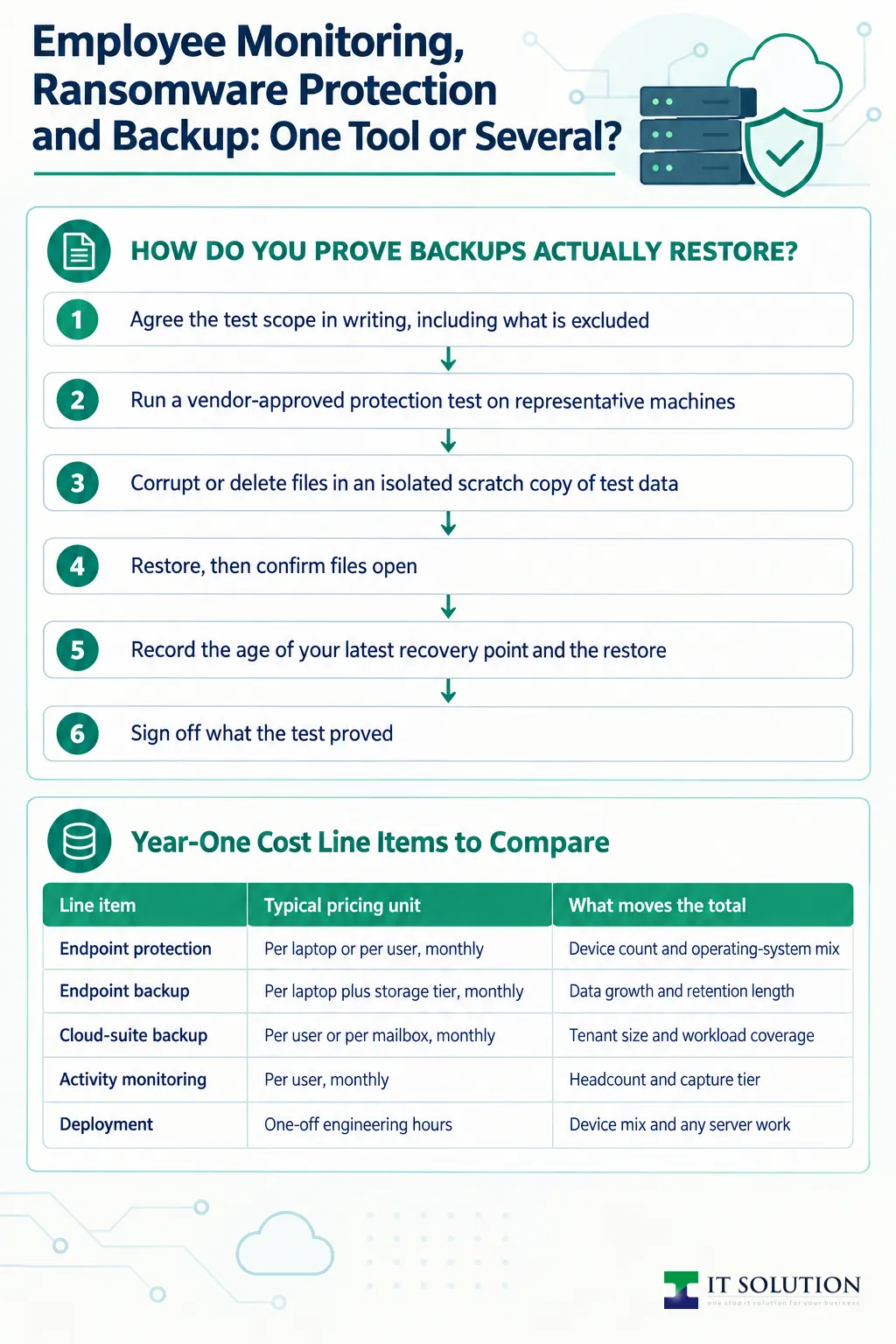
A structured exercise looks like this:
- Agree the test scope in writing, including what is excluded.
- Run a vendor-approved protection test on representative machines.
- Corrupt or delete files in an isolated scratch copy of test data.
- Restore, then confirm files open, contents match and permissions survive.
- Record the age of your latest recovery point and the restore duration.
- Sign off what the test proved, and what it deliberately left untested.
Include a cloud-only file on purpose. Create a document that exists only in the cloud suite, then attempt a restore from the laptop plan. The result tells you whether cloud-suite backup is a nice-to-have or a necessity. A Google Workspace cloud backup plan, for instance, can cover mailboxes and cloud-only Drive contents within its scope; files stored only locally need separate coverage.
Keep an offline or immutable backup copy to make it harder for ransomware to alter or delete it. Schedule restore tests regularly and after major changes, with the interval based on your recovery needs.
Pre-Signature Checks for a Single Platform
| Check | Why it matters | What to ask for |
|---|---|---|
| Licence scope | Console access does not prove entitlement | The exact SKU and service schedule |
| Operating systems | Coverage differs per function and platform | A supported-systems matrix for each function |
| Cloud workloads | Laptop plans can miss cloud-only files | Exchange Online, OneDrive and SharePoint named in scope |
| Monitoring capture | Features vary by agent and tier | A matrix for screen, app, URL and keystroke capture |
| Recovery | A blocked attack proves nothing about restores | A dated restore test with recorded results |
Is Employee Monitoring Allowed Under Singapore Law?
Yes, within limits: Singapore law permits qualifying employment-related monitoring without consent, but duties attach immediately.
The Personal Data Protection Act (PDPA) provides an exception for the employment relationship. Where collection, use or disclosure is reasonable for entering into, managing or terminating employment, consent is not required, as the Personal Data Protection Commission (PDPC) explains in its advisory guidelines on the PDPA for selected topics. The exception is conditional. It can cover purposes tied to managing the relationship, such as oversight of company computer-network use, but it does not authorise every monitoring practice.
Under this employment-relationship exception, employers must notify employees of the purposes of qualifying collection, use and disclosure. Whether another exception applies depends on the circumstances, so obtain legal advice for the proposed processing.
Retention has limits too. Once the purpose no longer needs the data, and retention is no longer necessary for legal or business reasons, the data must stop being kept or be made anonymous. Set a defined retention period for activity logs and enforce it.
If activity records containing personal data are transferred to a recipient outside Singapore, Section 26 of the PDPA applies. It requires prescribed arrangements that provide a comparable standard of protection for the transferred data.
Our design guidance when we scope monitoring: start from a defined purpose, disable capture you do not need, restrict access to named reviewers, require multifactor authentication and audit who opens records. For disciplinary or contentious use, take legal advice before go-live. This is our professional reading, not legal advice for your specific rollout.
Year-One Cost Line Items to Compare
| Line item | Typical pricing unit | What moves the total |
|---|---|---|
| Endpoint protection | Per laptop or per user, monthly | Device count and operating-system mix |
| Endpoint backup | Per laptop plus storage tier, monthly | Data growth and retention length |
| Cloud-suite backup | Per user or per mailbox, monthly | Tenant size and workload coverage |
| Activity monitoring | Per user, monthly | Headcount and capture tier |
| Deployment | One-off engineering hours | Device mix and any server work |
| Managed support | Monthly retainer | Coverage hours and response targets |
Who Owns Alerts, Isolation and Restore Tests?
Put each responsibility in writing before an incident, because a shared platform still needs named owners.
Bundles blur accountability. When one vendor supplies three functions, nobody obviously owns the overnight alert. Assignments worth writing down include:
- Who acknowledges alerts, and within which coverage hours.
- Who has authority to isolate an infected machine.
- Who executes restore tests, and how often.
- Who validates that recovered files are fit for business use.
- Which response target applies to acknowledgement, and which to full recovery.
Keep alert-response targets and recovery objectives separate. A fast acknowledgement means little if the mailbox restore takes days. Ask your provider to state both, per workload, in the service schedule.
Where the split is unclear, a short round of IT infrastructure consulting can map which function sits in which product before contracts are signed.
Conclusion
Staff monitoring, ransomware defence and file backup only look like one purchase. Match every promised function to a named line item, test the restore yourself and keep monitoring narrowly justified, notified and retention-capped under the PDPA.
Whether you end up with one near-bundle or several specialist tools, the decision should rest on verified capabilities, not marketing copy. Name your owners, separate acknowledgement targets from recovery objectives and re-run the restore test after any major change.
Our team scopes, deploys and tests these stacks for Singapore SMEs throughout the year. We are happy to review your current licences and entitlements before you renew or expand anything.
Check Your Stack Before You Renew
Send us your headcount, devices and cloud suite. We will map what your bundle truly covers, what needs its own tool and what your restore test should prove.
Frequently Asked Questions
Sometimes, but only if the exact licence you buy demonstrably covers all three. A shared console is not proof. Verify the SKU, operating systems, cloud workloads and capture features, then run a restore test before you rely on it.
It can be, under the PDPA employment-relationship exception, when the collection, use and disclosure reasonably serve managing employment. You must still notify staff of the purposes, limit retention and follow Section 26 for overseas transfers. Take legal advice for contentious or disciplinary uses.
They are recovery features, not a scoped backup service. Sync copies changes, including malicious ones, and retention windows are limited. Treat them as safety nets and back the tenant up separately.
Scope and exclusions first, then whether restored files open, contents match and permissions survive. Record the age of your latest recovery point and how long the restore took. A blocked attack simulation proves protection, not recoverability.
When the bundle cannot support your operating-system mix, cloud workloads, monitoring purpose or recovery objectives. Mixed devices, cloud-only files and long retention are the usual triggers. Compare year-one totals across licences, storage, deployment and support before deciding.

Qin
Digital Marketer
The company's offerings to include IT solutions such as domain registration, hosting, and comprehensive website services alongside digital marketing. Her work encompasses website development, graphic design, and email solutions to provide holistic digital strategies, focusing on Digital Business & Systems.