Your employee has just typed their Microsoft 365 password into a fake sign-in page. In our practitioners' judgement, the Microsoft 365 phishing response starts at that moment, not when the investigation finishes. What you do in the first hour decides the outcome.
Modern credential phishing is fast. Fake pages capture the password the moment it is submitted. Attackers then test it, trigger multi-factor authentication (MFA) prompts, and push into the mailbox. If your employee approved one of those prompts, the intruder may already hold a working session.
For a Singapore small and medium-sized enterprise (SME), the mailbox is where the business runs. Quotations, invoices, delivery instructions and banking correspondence all sit inside it. A careless sign-in therefore becomes a payment-fraud and data-protection problem, not just an IT problem.
Handled in the right order, the first hour gives you the initiative back. In this blog, we discuss how to triage the incident, contain the account, split roles across your team, and escalate correctly to finance, your bank, the police and the Personal Data Protection Commission (PDPC).
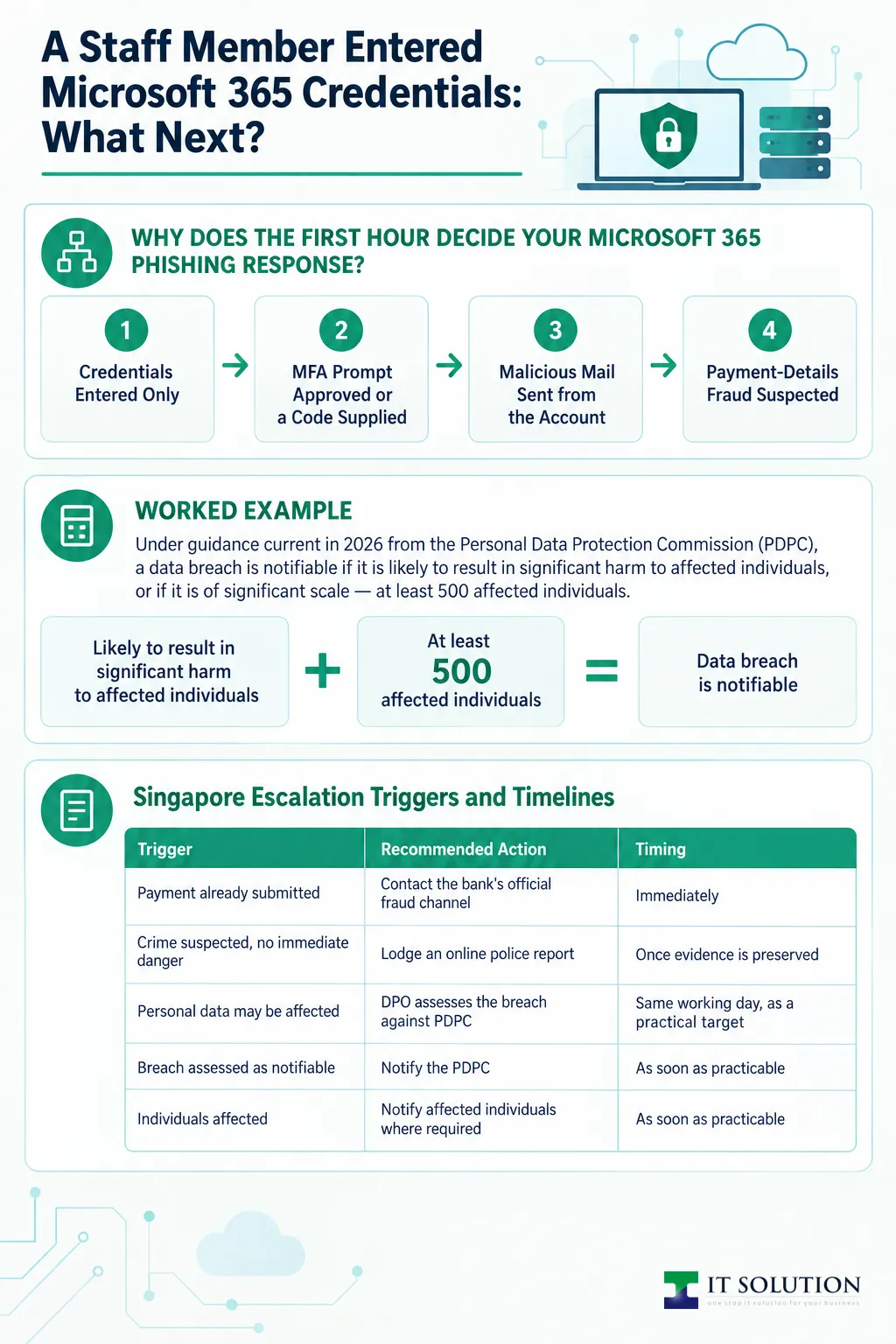
Why Does the First Hour Decide Your Microsoft 365 Phishing Response?
When an employee enters a Microsoft 365 password on a phishing page, treat it as a live key, not a past event. Attackers test stolen credentials quickly, and a mailbox can be read and forwarded within minutes of entry. Our general recommendation — practitioner judgement, not a documented procedure — is to contain first and investigate second.
That means deciding early which of four situations you are actually in. The scenarios overlap, and the most serious one sets the pace. Here is how the four compare.
1. Credentials Entered Only
Confirm exactly which fields were submitted and whether anything was downloaded. Reset the exposed password at its authoritative source, revoke active sessions, and review recent sign-in attempts. No MFA approval does not prove the attacker failed.
2. MFA Prompt Approved or a Code Supplied
Treat this as likely authenticated access. It covers an approved notification, a supplied code, a login relayed through an attacker-controlled proxy page, or a newly added authentication method. Prioritise sessions, authentication methods, mailbox access and application consent. Blocking sign-in during the investigation is a reasonable precaution.
3. Malicious Mail Sent from the Account
Establish the sending with evidence before drawing conclusions: message traces, mailbox records and audit logs. Distinguish a genuinely compromised mailbox from a spoofed sender. Then identify recipients, preserve samples, and warn them through a trusted channel. An empty Sent Items folder alone is not an all-clear.
4. Payment-Details Fraud Suspected
A changed beneficiary, an altered invoice or an unusual payment instruction is enough to act immediately, even before any transfer. Finance should verify instructions through previously trusted contact details and pause the affected payment workflow. Money protection runs in parallel with technical containment, never after it.
What Are the First Containment Steps After Credentials Are Entered?
Preserve the evidence, then contain the account before the log review is finished. Here is an illustrative walk-through of a disciplined first hour — a hypothetical sketch, not a record of any specific incident. What your team can actually do depends on your licences, admin roles, identity source and authorisation.
Step 1: Preserve the Evidence
Ask the employee to stop interacting with the page. Capture the original message, the fake URL and screenshots without revisiting the link. Record the time, what was typed, any approval and any download. Nobody should delete the message, clear browser history, or send the password to responders.
Step 2: Contain the Account
From a known-clean admin device, block the account's sign-in, reset the password at its authoritative identity source, and revoke active sessions. Establish that source first: a cloud-only account, a synchronised account and a federated login each reset differently. Do not wait for a completed log review before containing a reported password or MFA disclosure.
Step 3: Hunt for Persistence
A reset alone does not clean the tenant. The checks we prioritise include:
- mailbox forwarding settings, including silent redirects
- inbox rules, including hidden ones that move or delete replies
- delegate permissions: Full Access, Send As and Send on Behalf
- application consent grants and attacker-added authentication methods
Export any suspicious configuration before removing it. A legitimate-looking rule name does not make its destination legitimate.
Step 4: Review Sign-in and Audit Records
Work through interactive and non-interactive sign-ins around the event, with device and authentication details. Treat an unfamiliar location as a lead, not proof. Review audit events for authentication-method or account changes. No admin screen lists every stolen token, so keep watching for renewed access.
Step 5: Contain Sent Mail and the Money Flow
If mail may have gone out, trace outbound messages, list recipients and preserve samples. Warn colleagues through a separate channel; for external recipients, a call on a known number works better than email. Ask finance to pause any payment tied to the affected conversations.
Step 6: Log Actions and Escalate Deliberately
Keep a timeline of what was done and who authorised each disruptive step. Bring in your Data Protection Officer (DPO) where personal data may be affected. Leave sign-in blocked until validation finishes, and schedule follow-up checks — delayed records can complete the picture.
Four First-Hour Scenarios Compared
| Scenario | What It Usually Means | First Priority |
|---|---|---|
| Credentials entered only | Password submitted to a fake page; no MFA approval | Reset at source, revoke sessions, review sign-ins |
| MFA approved or code supplied | Likely authenticated access for the attacker | Block sign-in, then check methods, sessions and consent |
| Malicious mail sent | Outbound mail from the genuine mailbox | Trace sending, list recipients, preserve samples, warn |
| Payment-details fraud suspected | Altered invoice, beneficiary or payment instruction | Freeze the workflow, verify via trusted contact, involve the bank |
Who Should Do What During the First Hour?
Split the work early, because one person cannot contain, coordinate and investigate at once. The split below is a sample role-based phishing response checklist, not a contracted service level or a standing authorisation model. At IT Solution, we help clients prepare role-based first-hour plans and work through containment after a reported credential disclosure. If your team is thin, select a managed IT services provider with agreed emergency authorisations; our contact page lists ways to reach our practitioners.
1. The Employee: Report and Preserve
Stop using the phishing page. Report through a known channel — in person, by phone or from a personal device. Record the time, what was entered or approved, and any downloads. Do not delete the email, approve further prompts, or attempt a self-cleanup. If the password was reused elsewhere, say so without sending the password itself.
2. The Manager: Verify and Authorise
Open a separate coordination channel, such as a group chat on personal phones. Confirm the reporter's identity through a known number before acting on any instruction. Authorise emergency containment under your agreed process. Arrange a safe way for the employee to keep working, and warn colleagues about unusual messages from the affected account.
3. The Finance Contact: Protect the Money
Pause any payment connected to the affected conversations. Check beneficiary details against established records. Verify instructions using previously trusted contact details, never by replying to the suspicious thread. Preserve invoices, approvals, bank references and correspondence exactly as they are.
4. The IT Provider: Contain and Investigate
Own account containment, evidence collection, tenant checks and the incident log. Delegated access and an emergency admin account should exist before an incident, not be improvised during one. If nobody has working admin access, escalate through your contracted provider or Microsoft's official support and account-recovery route — support may not restore access within the hour. If you are reviewing arrangements, it pays to select the ideal managed IT services provider with agreed emergency authorisations.
First-Hour Roles and Non-Negotiables
| Role | Owns | Must Not |
|---|---|---|
| Employee | Report fast, record facts, preserve the message | Revisit the page, delete evidence, or share the password |
| Manager | Verify identity, authorise containment, coordinate | Act on instructions inside the suspicious thread |
| Finance contact | Pause payments, verify beneficiaries, keep records | Reply to the suspicious thread to check if it is genuine |
| IT provider | Contain the account, check the tenant, log actions | Wait for a completed investigation before containing |
When Should You Involve Your Bank, the Police and the PDPC?
Escalate the moment money has moved, and assess the rest deliberately. The Singapore Police Force allows online reports for crimes that do not need immediate police action. Under PDPC guidance, a data breach is notifiable if it is likely to result in significant harm to affected individuals or is of significant scale, meaning at least 500 affected individuals; after determining it is notifiable, report it as soon as practicable and no later than three calendar days after that determination. A bank contact is urgent; a police report and a data-breach notification both depend on what actually happened. Your DPO and legal advisers may also need to review contractual notification duties, liability and communications.
1. Contact the Bank Immediately If a Payment Was Submitted
Use your bank's current official fraud channel — the number printed on its official website or app. Ask about a recall or recovery request, but treat it as a request, not a guaranteed reversal. Preserve the transfer records, references and correspondence.
2. Lodge a Police Report Where a Crime Is Suspected
The Singapore Police Force (SPF) states that a police report can be lodged online for a crime that does not require immediate police action. The service lists its own supporting documents, so keep your evidence pack ready. Where funds may have moved, prompt reporting through official channels is worth considering. In an immediate emergency, call 999.
3. Assess PDPA Notification With Your DPO
Under guidance current in 2026 from the Personal Data Protection Commission (PDPC), a data breach is notifiable if it is likely to result in significant harm to affected individuals, or if it is of significant scale — at least 500 affected individuals. After determining that a breach is notifiable, notify the PDPC as soon as practicable. The deadline is no later than three calendar days after that determination, and affected individuals must be notified as soon as practicable where required. Not every mailbox compromise is notifiable: your DPO must assess the facts, including whether personal data was involved. This is regulatory information, not legal advice.
Singapore Escalation Triggers and Timelines
| Trigger | Recommended Action | Timing |
|---|---|---|
| Payment already submitted | Contact the bank's official fraud channel and request recall | Immediately |
| Crime suspected, no immediate danger | Lodge an online police report with supporting documents | Once evidence is preserved |
| Personal data may be affected | DPO assesses the breach against PDPC guidance | Same working day, as a practical target |
| Breach assessed as notifiable | Notify the PDPC | As soon as practicable; no later than 3 calendar days after the determination |
| Individuals affected | Notify affected individuals where required | As soon as practicable |
What Should Happen After the First Hour?
Validation, follow-up checks and hardening — the incident is not over when the panic subsides. Re-enabling an account before it has been validated simply invites a second compromise. These four follow-up actions close the gaps that let the attacker in. For broader preparation, review common cyberthreats and cybersecurity practices with the same team that owns your incident plan.
1. Validate Before Re-enabling Sign-in
Keep the account blocked until the reset, session revocation and MFA re-registration are confirmed with verified methods. Only then restore access, and tell the user which prompts to expect.
2. Keep Watching the Logs
Some records appear late, and non-interactive sign-ins can tell a different story from interactive ones. Schedule follow-up checks and watch for renewed access, unexpected rules or consent changes.
3. Harden the Tenant
A compromised mailbox is a prompt to raise the baseline:
- consider phishing-resistant MFA methods where your licences support them
- review sign-in and session policies
- restrict user consent for applications and legacy authentication
- limit automatic external forwarding where it is not needed
- reward fast, honest reporting instead of punishing it
Phishing sits high on the list of threats to Singapore businesses. Our ransomware prevention guide covers the most common cyberthreats and cybersecurity practices in more depth.
4. Keep Recoverable Copies of Business Data
Confirm that critical files have current, tested backups. A local copy on a network-attached storage (NAS) unit alongside cloud storage gives you a recovery path if a compromise escalates.
Conclusion
A phishing report is a containment exercise before it is an investigation. Preserve the evidence, reset the password at its authoritative source, revoke sessions, and hunt for persistence before trusting the account again. If an MFA prompt was approved, or payment details changed, raise the tempo.
Singapore escalation then follows a simple order: bank first if money moved, an online police report for the crime, and a DPO-led PDPA assessment wherever personal data is involved. None of these steps guarantees recovery, but each preserves your options.
At IT Solution, our practitioners help Singapore SMEs contain Microsoft 365 account exposure, sweep tenants for persistence, and harden against the next attempt. Tell us what your employee entered or approved, and we will help you work through the checklist.
Contain a Suspected Microsoft 365 Compromise Today
Tell us what your employee entered, approved or sent, and when. Our practitioners will help contain the account, sweep the tenant and escalate correctly.
Frequently Asked Questions
No. Reset the password at its authoritative source and revoke sessions, then check forwarding settings, inbox rules, delegates, consent grants and authentication methods. Persistence can survive a reset, so validate the account before trusting it again.
Treat it as likely authenticated access. Block sign-in during the investigation, reset the password, revoke sessions, and prioritise authentication methods, mailbox access and application consent. Consider phishing-resistant MFA methods afterwards.
Not every phishing event requires one. The Singapore Police Force allows an online report for crimes that do not need immediate police action, and reporting is worth considering where funds moved. Preserve supporting documents, and call 999 in an emergency.
Not automatically. A breach is notifiable if it is likely to cause significant harm to individuals or affects at least 500 of them. Once you determine it is notifiable, notify the PDPC as soon as practicable and within three calendar days. Your DPO should assess the facts; this is regulatory information, not legal advice.
Not reliably. Establish what was sent through message traces and audit records, preserve samples, and warn recipients through a trusted channel such as a known phone number. A fast warning beats an attempted recall.

Qin
Digital Marketer
The company's offerings to include IT solutions such as domain registration, hosting, and comprehensive website services alongside digital marketing. Her work encompasses website development, graphic design, and email solutions to provide holistic digital strategies, focusing on Digital Business & Systems.